Assign contact
This branch defines where two bodies may come into contact. The behaviour of the interface — friction, penetration, separation — belongs to a named interaction defined in the interaction manager; the tree records which surfaces it applies to.
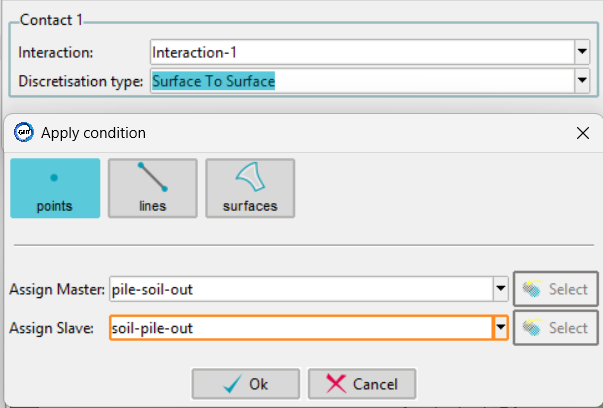
Settings
Interaction is chosen from the interactions defined in the interaction manager. The list cannot be typed into. An Edit interactions command opens the manager directly from the tree.
Discretisation type selects how contact is enforced:
| Option | Meaning |
|---|---|
| Surface To Surface | Contact is evaluated between the two surfaces as a whole |
| Node To Surface | Each slave node is checked against the master surface |
 Contact pair
A contact pair is exactly one master group and one slave group. Both are assigned from points, lines or surfaces.
The order of selection is what distinguishes them: the first group selected becomes the master, the second becomes the slave.
Important
Master and slave are not interchangeable. As a rule the stiffer or coarser body is the master and the softer or finer one the slave — for a pile in soil, the pile is normally the master.
Each pair needs its own entry. A model with a pile shaft and a pile base in contact with the soil has two contact pairs, not one with four groups.
Contact is described under Contacts in the numgeo reference manual.