Initial-condition manager
An initial condition sets the state a region of the model starts from, before the first calculation step runs. In a geotechnical model this matters as much as the loading: the response of soil depends on the stress, the density and the pore pressure it begins with.
Unlike the other managers, this one does not build a library of named definitions to be referenced elsewhere. Each entry is an assignment — a type, a set of values, and the groups it applies to.
Open the manager with the  button in the numgeo toolbar, or from numgeo → Manager → Initial conditions.
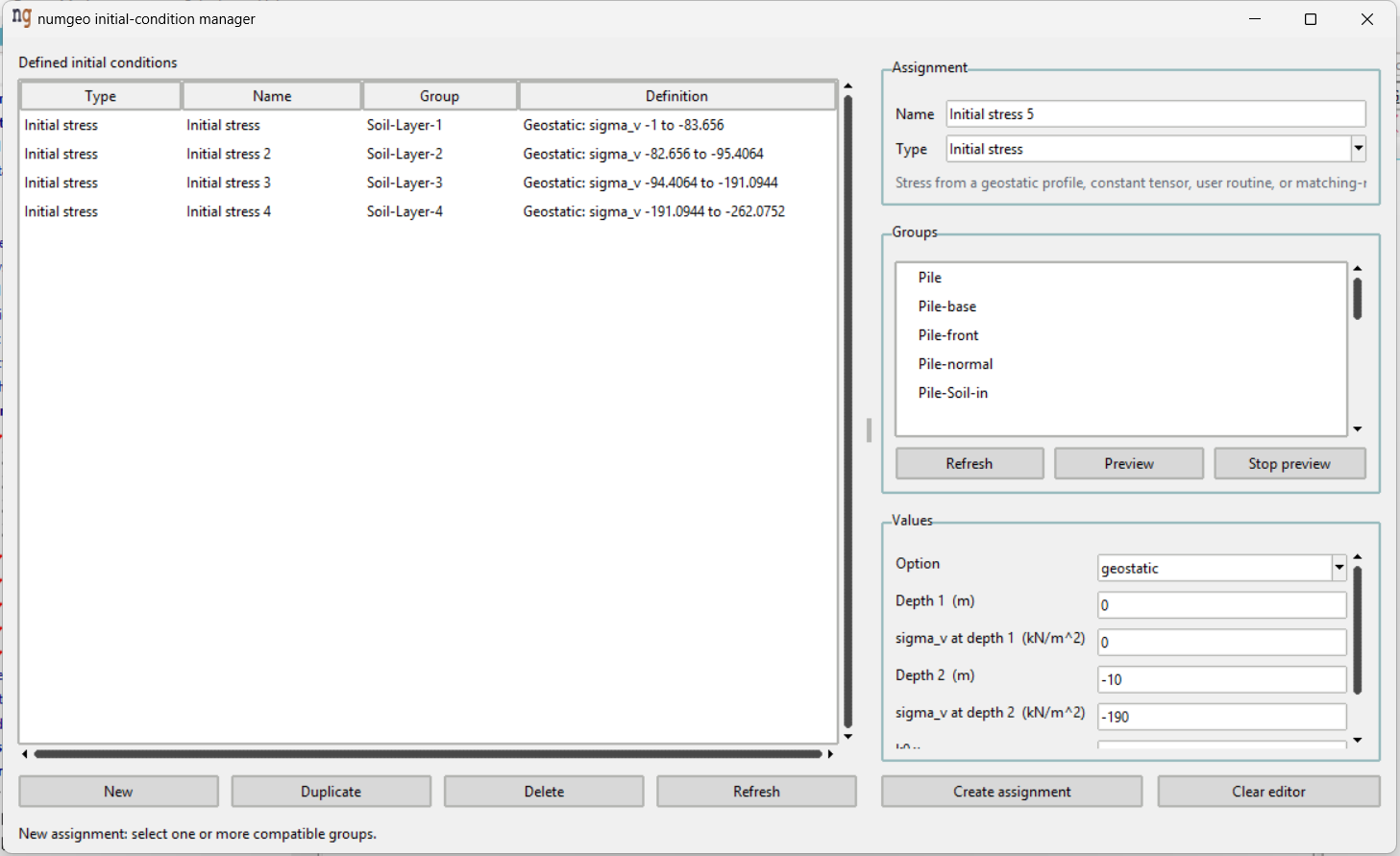
Window layout
The Defined initial conditions list on the left shows every assignment with its type, name, group and a summary of its definition, so what a model starts from can be read at a glance. New, Duplicate, Delete and Refresh act on whole assignments.
The editor on the right has three parts:
Assignment — the name of the entry and its type. Changing the type rebuilds the values below, so choose it first.
Groups — the groups the condition applies to, listed from the groups defined in the model. Refresh rereads them after groups have been added or renamed in GiD. Preview draws the selected groups in the viewport so the right region can be confirmed before assigning, and Stop preview clears the drawing.
Values — the parameters of the chosen type.
At the bottom, Create assignment adds a new entry. It becomes Update assignment when an existing entry is being edited, and Create duplicate after duplicating. Clear editor empties the form to start a fresh entry.
Types
Initial void ratio
The void ratio the soil starts from. Assignable to surfaces and volumes.
A single value, dimensionless.
Initial stress
The stress state the model starts from, given one of four ways through the Option field.
geostatic — a linear vertical stress profile between two depths, with lateral earth pressure coefficients:
| Field | Unit |
|---|---|
| Depth 1 | m |
| sigma_v at depth 1 | kN/m² |
| Depth 2 | m |
| sigma_v at depth 2 | kN/m² |
| k0,x | – |
| k0,y | – |
This is the usual choice. The two depth–stress pairs define the vertical stress
profile, and k0,x and k0,y give the horizontal stresses from it.
full — a constant stress tensor applied over the whole group: sigma1,
sigma2, sigma3, sigma12, sigma13 and sigma23, all in kN/m².
user — the stress is supplied by a user routine. See Initial stress in the numgeo reference manual.
file — the stress is read from a numgeo binary restart file, selected with Browse.
Warning
A stress restart file only works when the mesh of the new simulation matches the mesh stored in the file. Remeshing invalidates it.
Pore water pressure
A linear pore-water-pressure profile between two depths. Assignable to points, lines, surfaces and volumes.
| Field | Unit |
|---|---|
| Depth 1 | m |
| Pore pressure at depth 1 | kN/m² |
| Depth 2 | m |
| Pore pressure at depth 2 | kN/m² |
Pore air pressure
A linear pore-air-pressure profile between two depths, with the same fields as pore water pressure. For three-phase materials.
State variable
Initial values for the state variables of a constitutive model. Assignable to points, lines, surfaces and volumes.
The Option field selects how the values are given:
| Option | Fields |
|---|---|
| default | State variable name, Value |
| user | — |
| fluctuation | State variable name, Maximum value, Minimum value, Correlation length |
| spatial data | State variable name, Spatial data layout, Spatial data filename |
default assigns one value to the whole group.
fluctuation generates a spatially varying random field between a maximum and a minimum, with the given correlation length in metres.
spatial data reads the values from a text file. The layout says how the file
is organised — x-data, y-data, z-data, xy-data or xyz-data — and the
filename is given without its .txt extension. The file must be in the
calculation directory.
user takes the values from a user routine. See Initial state variables in the numgeo reference manual.
The State variable name must be the exact identifier the constitutive model expects; it is required for every option except user.
The same state variable cannot be assigned twice to the same group.
Validation
Assignments are checked when they are created or updated. A problem shows a warning naming it, and the editor keeps its contents so it can be corrected.
Initial conditions are described under Initial conditions in the numgeo reference manual.