Beam properties
A beam is a one-dimensional member that carries axial force, bending, shear and torsion. Describing that behaviour takes eight parameters rather than the two a truss needs.
The tab is shown when the element type is set to Beam.
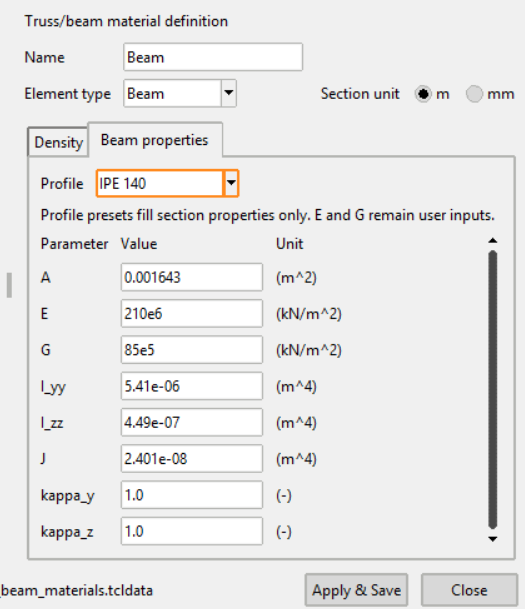
Parameters
| Parameter | Unit | Meaning |
|---|---|---|
A |
m² | Cross-sectional area |
E |
kN/m² | Young's modulus |
G |
kN/m² | Shear modulus |
I_yy |
m⁴ | Second moment of area about the local y-axis |
I_zz |
m⁴ | Second moment of area about the local z-axis |
J |
m⁴ | St. Venant torsional constant |
kappa_y |
– | Shear correction factor in the local y-direction |
kappa_z |
– | Shear correction factor in the local z-direction |
A and E give the axial stiffness, as for a truss. I_yy and I_zz give
the bending stiffness about the two local axes, J and G the torsional
stiffness, and the two shear correction factors account for shear deformation
across the section.
Units are shown for the m section unit. With mm selected, the area is read in mm² and the second moments in mm⁴.
Note
Enter every value in the unit currently selected above. The manager does not convert values that are already in the table when the unit is changed, and a second moment left in mm⁴ while the unit says m⁴ is wrong by twelve orders of magnitude.
Profile
Selecting an IPE profile from the Profile list fills A, I_yy, I_zz
and J for the chosen section, converted to the section unit currently
selected.
E, G, kappa_y and kappa_z remain your inputs. For structural steel E
and G are the usual constants; the shear correction factors depend on the
shape of the section.
Validation
All eight parameters must be filled, along with the density. Pressing Apply & Save with one missing shows a warning naming the problem, and the material stays open so it can be corrected.
See Beam properties in the numgeo reference manual.