Skip to content

Interaction manager

An interaction describes how two surfaces behave when they touch: how much they may penetrate, whether they can separate again, and how much shear they transmit. The interaction manager defines these properties; the Contact branch of the data tree then applies a named interaction to a specific pair of surfaces.

Open it from the numgeo tools toolbar or from numgeo → Manager → Interaction.

How interactions are stored

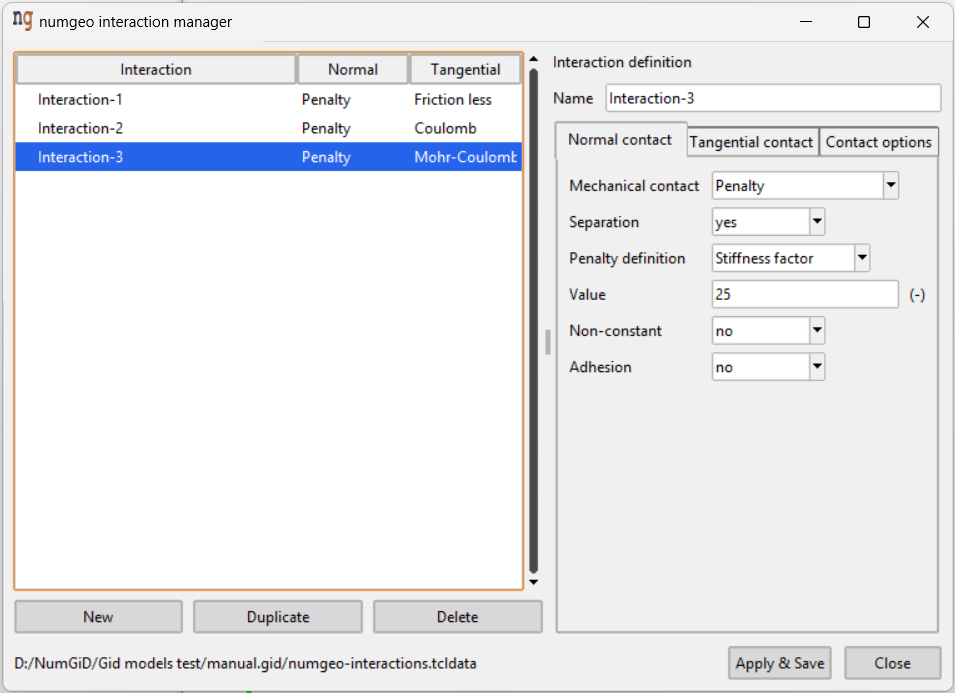
Interactions live in numgeo-interactions.tcldata next to the GiD project. Only the interaction name reaches the data tree, so the database must travel with the project when it is copied by hand.

The list on the left shows each interaction with its normal and tangential model, so the essentials of a definition are visible without opening it. New, Duplicate and Delete act on whole interactions; Apply & Save, Close and Use selected interaction work as in the material manager.

Normal contact

Governs behaviour perpendicular to the contact surfaces.

Mechanical contact is the enforcement method. Penalty is currently the only option: penetration is resisted by a stiff spring rather than prevented exactly, which is numerically robust and avoids the extra unknowns of a Lagrange formulation.

Separation decides whether the surfaces may come apart again once they have touched. Enabled by default. Disable it to tie the surfaces together in tension — useful when modelling a bonded interface, but be aware it will transmit tensile stress that a real soil–structure interface could not.

Penalty definition sets how the penalty stiffness is specified:

Option Meaning
Stiffness factor A multiple of the stiffness of the adjacent elements (default, value 25)
Constant An absolute stiffness value

A stiffness factor is usually preferable, because it scales automatically with the stiffness of the surrounding material. Too low a value allows visible penetration; too high a value degrades convergence.

Non-constant allows the penalty stiffness to vary rather than being held fixed throughout the analysis.

Adhesion adds a tensile resistance to the normal direction. When enabled, an adhesion value must be entered.

Tangential contact

Governs the shear transmitted along the contact surfaces.

Friction model selects the constitutive behaviour of the interface:

Model Parameters
Friction less none
Coulomb tan(delta), adhesion c
Mohr-Coulomb tan(delta), tan(theta), adhesion c
Hypoplasticity_numgeo 16 parameters (see below)

Friction less is the default and transmits no shear at all. Coulomb limits the shear stress to a fraction of the normal stress. Mohr-Coulomb adds a dilatancy term through tan(theta). The hypoplastic interface model reproduces the behaviour of an interface under cyclic loading, at the price of many more parameters:

d_s, kappa, phi, nu, h_s, n, e_d0, e_c0, f_ei0, alpha, beta, m_T, m_R, R, beta_R, chi

Note

The friction angle and dilatancy angle are entered as tangents, not as angles in degrees. A friction angle of 30° is entered as tan(delta) = 0.577.

User defined friction hands the friction behaviour over to your own implementation. The parameter table is then not required.

Tangential stiffness applies to the Coulomb and Mohr-Coulomb models only, and works like the normal penalty definition — either a stiffness factor or a constant value. It controls the elastic shear displacement before slip occurs. The hypoplastic and frictionless models do not use it, and the field disappears when they are selected.

Contact options

Numerical settings of the contact search.

Write contact option controls whether this block is written at all. Enabled by default.

Clearance is the gap within which two surfaces are considered to be in contact. The default is 1d-6. It must be filled whenever contact options are written.

Check displacement/distance enables two additional checks on the contact search, and requires both values when switched on:

Field Default Purpose
Check Disp 0.05 Displacement threshold triggering a renewed contact search
Check Dist 2.5 Distance threshold within which pairs are considered

These reduce the cost of contact detection: rather than re-evaluating every potential pair at every iteration, the search is repeated only when a surface has moved far enough to matter.

Reduction activates a reduction of the contact stiffness.

Validation

Checked on Apply & Save, reporting the first problem found:

  • The name must not be empty or contain commas or line breaks.
  • The normal-contact value must be filled unless the penalty definition is left unselected.
  • An adhesion value is required when adhesion is enabled.
  • A tangential-stiffness value is required when a stiffness definition is selected for a model that uses one.
  • All friction-model parameters must be filled, unless user-defined friction is active.
  • Clearance must be filled when contact options are written.
  • Check Disp and Check Dist must both be filled when the checks are enabled.

Defaults

A new interaction starts as a frictionless penalty contact with separation allowed:

Setting Default
Mechanical contact Penalty
Separation yes
Penalty definition Stiffness factor, value 25
Friction model Friction less
Tangential stiffness Stiffness factor, value 1
Write contact option Yes
Clearance 1d-6
Check displacement/distance No
Reduction no