Surface
This keyword is used to define a surface containing element edges or faces.
*Surface, Type = <surf type>, Name = <surface name>
<set name>, [<face number>]
-
Name = <surface name>: Set this parameter equal to the name of the surface. This parameter is mandatory. -
Type = <surf type>specifies if the surface definition is node based or element based:-
Type = node:The
<set name>has to be a predefined node set. The definition of a<face number>is not required. numgeo will automatically find all element surfaces defined by the nodes in the specified node set. For this, it is necessary that the node set is (topologically) continuous; see also Figure 1.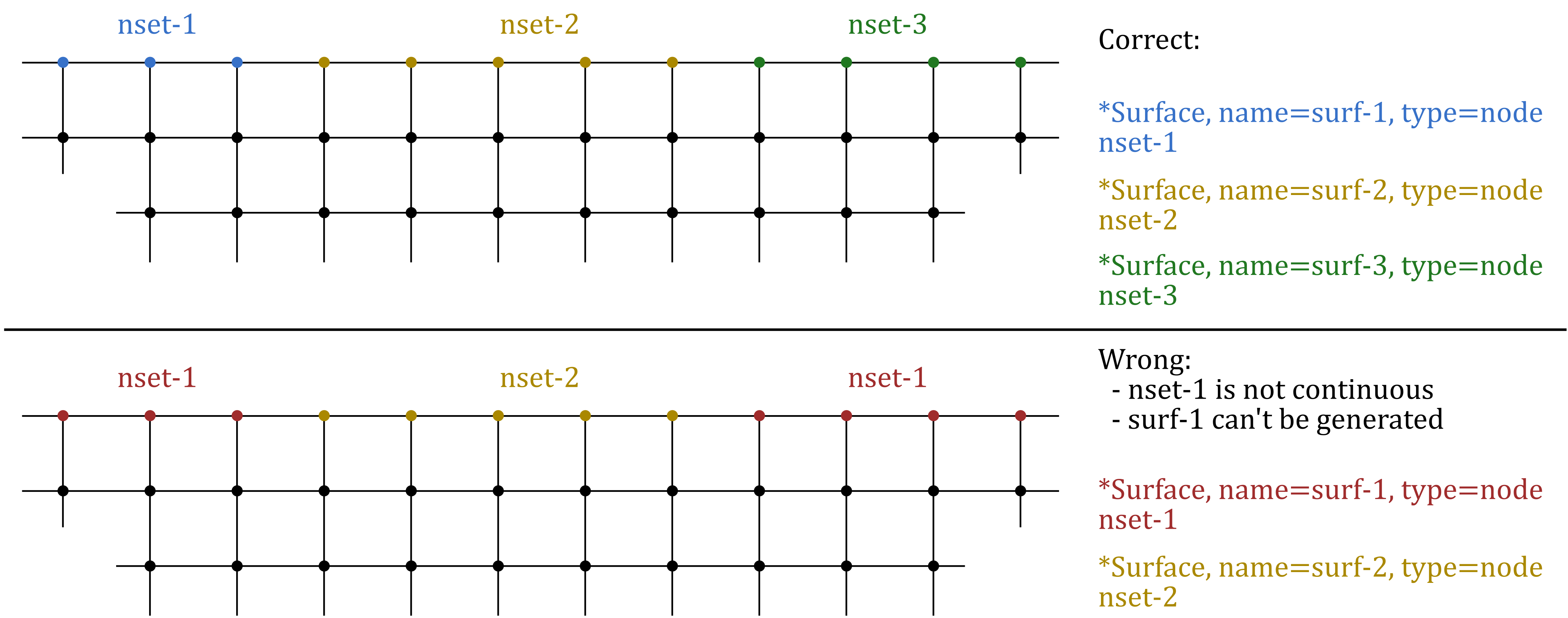
Figure 1: Examples of node-based surfaces. Top: correct surface definitions, Bottom: wrong surface definitions (nset-1 is not continuous). -
Type= element:The
<set name>has to be a predefined element set. The definition of a<face number>is required. The face number has to be given as e.g.F4orS4in case the fourth element faces are assigned to the surface.
-
Both surface definitions can be used further in the definition of contact pairs (see *Contact pair) or distributed surface loads (see *DSload).